

Microsoft Excel
| Version | 365(as of 12/9/2020) |
| Platforms | Windows, Mac |
| License | Commercial |
| Category | Productivity |
Main Features
- Support for XLSX and XLS formats, and various other spreadsheet types
- Basic and advanced data manipulation
- Processing power for large data sets
- Can import and export data in many different formats
- Complex mathematical formula support
- Advanced support for VBScript scripting
- Large number of charts and functions
Software Overview
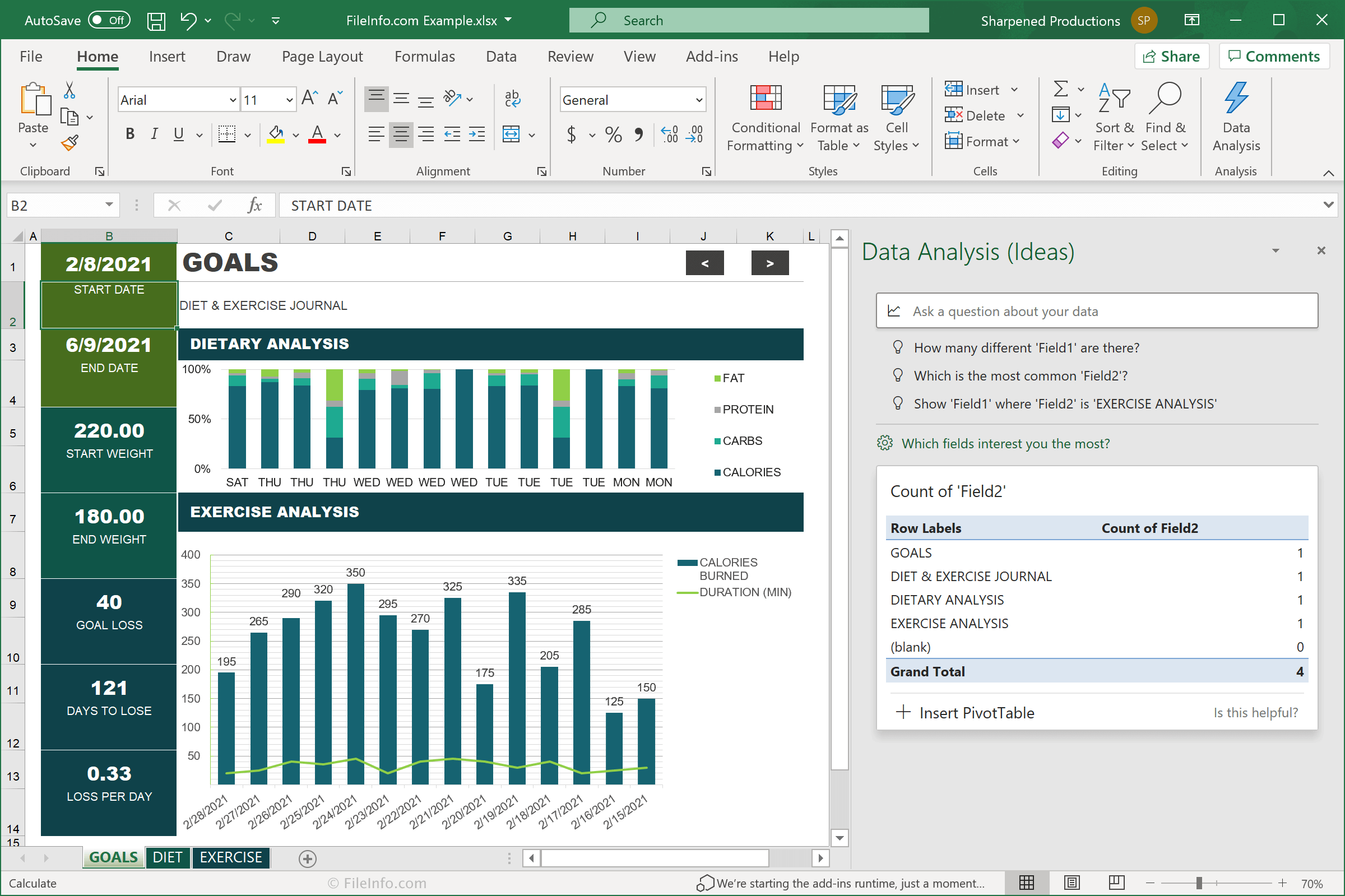
Microsoft Excel is a widely-used spreadsheet program that is part of the Microsoft Office suite. It provides a powerful feature set for organizing, manipulating, and visualizing data.
Excel workbooks are divided by tabbed worksheets, each of which can be edited independently. Each worksheet contains a two-dimensional grid of cells, which can be formatted in various ways. Excel includes basic features, such as data sorting and simple formula creation, as well as advanced capabilities, such as pivot table reports and VBScript macro scripting. It also provides document security and password protection for data within a workbook. Newer versions of Excel save workbooks in the Office Open XML (OOXML) .XLSX format, while older versions use the proprietary .XLS format.
Excel has many tools that help quickly analyze data. From data import features to automatic sorting, filtering, and pivot tables, users can take large external data sets and gather analyses quickly. The extensive set of mathematical functions also gives the ability to manipulate data and compute results. Excel provides thousands of online templates available for download within the user interface. This gives users many different options for out-of-the-box styling, formatting, and mathematical computation, allowing them to focus on the data rather than extensive amounts of time on presentation. For example, financial templates can be downloaded by home or business users for tracking income, expenses, and transactions, as well as for automatically generating summary graphs.
The spreadsheet application also provides rich tools for visualizing data. Excel supports simple chart types such as bar charts, line graphs, pie charts, and scatter plots, as well as more complex ones for more in-depth analysis. These charts can be styled with a variety of visual options.
Microsoft Excel is a great program for your data management needs. Whether you are using it for personal, academic, or professional purposes, you will appreciate Excel’s ability to quickly organize and manipulate data to perform statistical analyses and create visualizations. These reasons among others are what make Excel an industry-standard application.
Primary File Type
 .XLSXMicrosoft Excel Spreadsheet
Supported File Types
| Extension | File Type |
|---|---|
| .XLSX | Microsoft Excel Spreadsheet |
| .CRTX | Office 2007 Chart Template File |
| .CSV | Comma-Separated Values File |
| .EFTX | Office 2007 Theme Effect File |
| .MHT | MHTML Web Archive |
| .MHTML | MIME HTML File |
| .ODC | Office Data Connection File |
| .ODS | OpenDocument Spreadsheet |
| .PRN | Lotus 1-2-3 Formatted Text File |
| .SLK | Symbolic Link File |
| .THMX | Office 2007 Theme |
| .TSV | Tab-Separated Values File |
| .UDCX | Universal Data Connection File |
| .XL | Microsoft Excel Spreadsheet |
| .XLA | Microsoft Excel Add-In File |
| .XLAM | Microsoft Excel Macro-Enabled Add-In |
| .XLB | Microsoft Excel Toolbar Settings File |
| .XLK | Microsoft Excel Backup File |
| .XLL | Microsoft Excel Add-in |
| .XLM | Microsoft Excel Macro |
| .XLR | Works Spreadsheet |
| .XLS | Microsoft Excel Spreadsheet (Legacy) |
| .XLSB | Microsoft Excel Binary Spreadsheet |
| .XLSHTML | Microsoft Excel HTML Spreadsheet |
| .XLSM | Microsoft Excel Macro-Enabled Spreadsheet |
| .XLSMHTML | Microsoft Excel MIME HTML Spreadsheet |
| .XLSX | Microsoft Excel Spreadsheet |
| .XLT | Microsoft Excel Spreadsheet Template (Legacy) |
| .XLTHTML | Microsoft Excel HTML Spreadsheet Template |
| .XLTM | Microsoft Excel Macro-Enabled Spreadsheet Template |
| .XLTX | Microsoft Excel Spreadsheet Template |
| .XLW | Microsoft Excel Workspace |
| .XML | XML File |
Additional Related File Types
| Extension | File Type |
|---|---|
| .AW | Answer Wizard File |
| .BMP | Bitmap Image |
| .DATA | Analysis Studio Offline Data File |
| .DEL | Delimited ASCII File |
| .DEX | Microsoft Excel Spreadsheet |
| .DIB | Device-Independent Bitmap Image |
| .DICPROOF | Microsoft Dictionary Proofing File |
| .DIF | Data Interchange Format |
| .DOC | Microsoft Word Document (Legacy) |
| .DQY | Microsoft Excel Query |
| .EMF | Enhanced Windows Metafile |
| .EXD | Control Information Cache File |
| .GIF | Graphical Interchange Format File |
| .GRA | Microsoft Graph File |
| .HTM | Hypertext Markup Language File |
| .IIF | Intuit Interchange Format File |
| .IQY | Internet Query |
| .JPEG | JPEG Image |
| .JPG | JPEG Image |
| .OLB | OLE Object Library |
| .RDF | Report Definition File |
| .RELS | Open Office XML Relationships File |
| .RLE | Run Length Encoded Bitmap |
| .SHS | Microsoft Scrap File |
| .SKV | Semicolon Separated Values File |
| .TAB | Tab Separated Data File |
| .TDL | Tab Delineated Format File |
| .TSV | Tab-Separated Values File |
| .TXT | Plain Text File |
| .WMF | Windows Metafile |
| .WPG | WordPerfect Graphic |
| .WQ1 | Quattro Pro for DOS Spreadsheet File |
| .XLW | Microsoft Excel Workbook |