

Adobe InDesign
| Version | 2023(as of 1/19/2023) |
| Platforms | Windows, Mac |
| License | Commercial |
| Category | Graphics |
Main Features
- Advanced professional page layout design
- Automatic page content generation
- Layout adjustment reconfigures text and graphics when altering the size of a document
- Visual font browsing to find the right fonts quicker
- Content-aware fit automatically resizes and fits images
- Support for importing and placing SVG images in a document
- Reverse spell check to go backward when checking for spelling errors
- Team collaboration tools to sync content
Software Overview
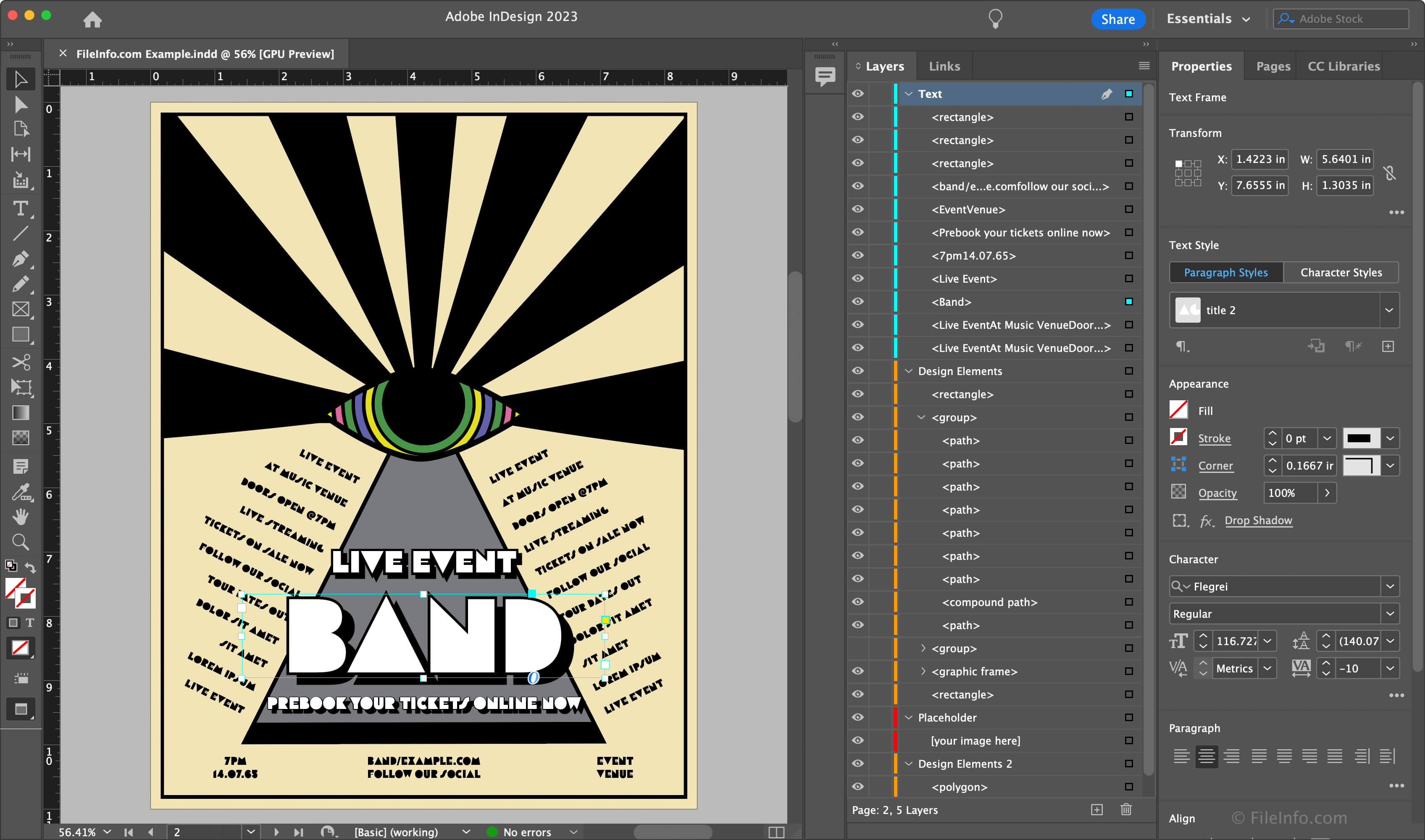
InDesign is a desktop publishing application for creating professional layouts for print and digital publishing, such as brochures, magazines, posters, reports, and interactive online documents. The software includes many advanced page layout tools, free stock templates, and collaboration features to sync work across teams.
In InDesign, you can begin from scratch or choose from one of their thousands of templates. You can customize each object as you design your document, including scaling images and text that InDesign automatically fits within document guidelines. While editing a document, the Live Preflight feature helps you fix page errors as they arise. InDesign also supports automated cross-references, conditional text, and bullets and numbering across large documents. In addition, you can create your own content or import data from a database in XML format.
InDesign includes advanced features for creating digital content, such as eBooks and digital magazines. The application allows you to add video, audio, animations, and slideshows to your documents to create a more interactive experience for your audience. And if you are editing a collaborative document, you can easily share it for review with team members and sync fonts and graphics across projects. When you finish designing your layout, you can publish your content directly to the web or in various file formats, such as .PDF, .EPUB, .JPEG, .PNG, .EPS, .HTML, and .XHTML.
Summary
InDesign is a professional print and digital publishing tool included with the Adobe Creative Cloud (CC) suite that you can also use as a standalone application. Its wide range of features will help you create professional-looking documents and digital designs, whether on your own or with a team. While it may be overwhelming for casual users, Adobe InDesign is an excellent option for professional publishers.
Primary File Type
 .INDDAdobe InDesign Document
Supported File Types
| Extension | File Type |
|---|---|
| .INDD | Adobe InDesign Document |
| .AI | Adobe Illustrator Artwork |
| .ASE | Adobe Swatch Exchange File |
| .BMP | Bitmap Image |
| .CSF | Adobe Color Settings File |
| .DCST | Adobe InDesign Document Presets File |
| .DIB | Device-Independent Bitmap Image |
| .EMF | Enhanced Windows Metafile |
| .EPS | Encapsulated PostScript File |
| .FLST | Adobe InDesign Flattener Presets File |
| .GIF | Graphical Interchange Format File |
| .ICAP | InCopy Package File |
| .ICMA | InCopy Assignment File |
| .ICML | InCopy Document |
| .IDAP | Adobe InDesign Assignment Package |
| .IDLK | Adobe InDesign Lock File |
| .IDML | Adobe InDesign Markup Language File |
| .IDMS | Adobe InDesign Snippet |
| .INCA | InCopy CS3 Assignment File |
| .INCD | InCopy Document |
| .INCP | InCopy CS3 Package File |
| .INCX | InCopy CS3 Interchange File |
| .INDB | Adobe InDesign Book File |
| .INDESIGNPLUGIN | Adobe InDesign Plug-in |
| .INDK | Adobe Shortcut Set File |
| .INDL | Adobe InDesign Library |
| .INDP | Adobe InDesign CS3 Package File |
| .INDS | Adobe InDesign Snippet File |
| .INDT | Adobe InDesign Template |
| .INLK | Adobe InDesign Lock File |
| .INLX | Adobe InDesign Interchange Library |
| .INMS | Adobe InDesign Menu Set File |
| .INX | Adobe InDesign Interchange File |
| .JOBOPTIONS | Adobe Joboptions File |
| .JPG | JPEG Image |
| .LNST | Adobe InDesign Line Presets File |
| .PCT | Picture File |
| Portable Document Format File | |
| .PDFS | Adobe PDF Presets File |
| .PLN | Adobe InDesign Plug-in |
| .PMD | PageMaker Document |
| .PNG | Portable Network Graphic |
| .PRST | Adobe InDesign Printer Presets File |
| .PSD | Adobe Photoshop Document |
| .PSET | Adobe InDesign Plug-in Set File |
| .QXD | QuarkXPress Document |
| .QXP | QuarkXPress Project File |
| .QXT | QuarkXPress Template |
| .RTF | Rich Text Format File |
| .SCT | Scitex Continuous Tone Image |
| .SMRD | Adobe InDesign Filter File |
| .SMWT | Adobe InDesign Filter |
| .SVG | Scalable Vector Graphic |
| .TIF | Tagged Image File |
| .TXT | Plain Text File |
| .UDC | Adobe InDesign User Dictionary |
| .XFL | Animate Uncompressed Animation |
Additional Related File Types
| Extension | File Type |
|---|---|
| .AIF | Audio Interchange File Format |
| .AIFF | Audio Interchange File Format |
| .AU | Sun Microsystems Audio File |
| .AVI | Audio Video Interleave File |
| .CT | Scitex Continuous Tone Image |
| .DCS | Desktop Color Separation File |
| .DOC | Microsoft Word Document (Legacy) |
| .DOCX | Microsoft Word Document |
| .HTML | Hypertext Markup Language File |
| .IND | Adobe InDesign Document |
| .JPE | JPEG Image |
| .JPEG | JPEG Image |
| .LEX | Adobe Linguistic Library Data File |
| .MPEG | MPEG Video |
| .MPG | MPEG Video |
| .P65 | PageMaker 6.5 Document |
| .PCX | Paintbrush Bitmap Image File |
| .PDD | Adobe PhotoDeluxe Image |
| .PICT | Picture File |
| .PM3 | PageMaker 3 Document |
| .PM6 | PageMaker 6.0 Document |
| .PMG | PageMaker Group File |
| .PUB | Publisher Document |
| .QT | Apple QuickTime Movie |
| .QTM | Apple QuickTime Movie |
| .RLE | Run Length Encoded Bitmap |
| .TIFF | Tagged Image File Format |
| .TRP | HD Video Transport Stream |
| .WAV | WAVE Audio |
| .WMF | Windows Metafile |
| .XLS | Microsoft Excel Spreadsheet (Legacy) |
| .XLSX | Microsoft Excel Spreadsheet |
| .XML | XML File |