

Intuit TurboTax
| Version | 2025(as of 4/14/2026) |
| Platforms | Windows, Mac, Web |
| License | Commercial |
| Category | Productivity |
Main Features
- Provides easy-to-follow, guided process to help users complete their tax returns with accuracy
- Prepares and files tax returns for both federal and state taxes, including multi-state filings
- Imports financial data directly from banks, investment accounts, and payroll providers
- Automatically searches for deductions and credits to maximize refunds or minimize owed taxes
- Offers audit assistance with guidance on handling IRS notices and potential audits
- Encrypts tax files with password protection to ensure that sensitive information remains secure
Software Overview
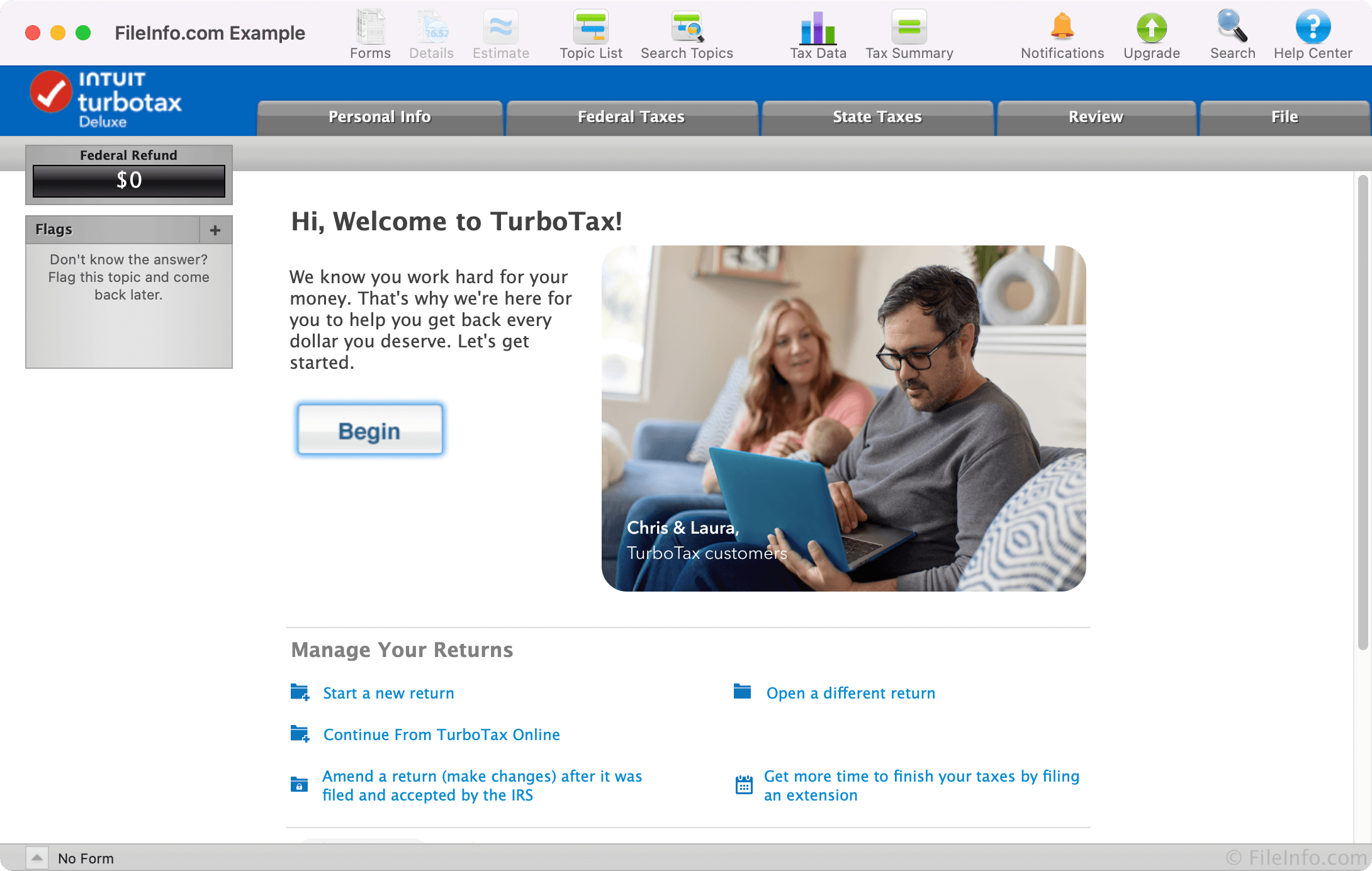
TurboTax 2025 is a tax preparation program that helps U.S. taxpayers file their federal and state returns for the 2025 tax year. It guides users through the process step by step, using built-in tools to answer questions and check for errors along the way.
TurboTax is available as both a desktop application and an online service:
The desktop version comes in four editions designed for different needs:
- TurboTax Basic
- TurboTax Deluxe
- TurboTax Premier
- TurboTax Home & Business
The software guides users through key sections, including Personal Info, Federal Taxes, State Taxes, Review, and Filing. It asks straightforward questions, gathers the necessary information, and automatically fills out the required forms. A real-time tracker shows your estimated refund or amount owed as you go. For those who prefer more control, the desktop version also includes a "Forms" view for direct entry into tax documents.
TurboTax includes accuracy checks and is updated to reflect current tax laws, helping ensure calculations are correct and refunds are maximized. Its guarantees apply to a wide range of users, including individuals, self-employed filers, and small business owners. Additional help is available through live expert support and an online help center.
The software can import data from prior-year returns (such as .TAX2024 files), as well as .PDF documents from other tax programs like TaxAct and H&R Block Tax Software. It also supports importing financial data from Quicken and certain banks and financial services.
Summary
TurboTax 2025 is a flexible and user-friendly tax preparation solution used by individuals, freelancers, and small business owners. Its guided approach, support options, and data import features make it a practical choice for filing your own taxes.
Primary File Type
 .TAX2025TurboTax 2025 Tax Return
Supported File Types
| Extension | File Type |
|---|---|
| .TAX2025 | TurboTax 2025 Tax Return |
| .TAX2024 | TurboTax 2024 Tax Return |
| .TXF | Tax Exchange Format |
Additional Related File Types
| Extension | File Type |
|---|---|
| .1PE | TurboTax Form File |
| .1PH | TurboTax Data File |
| .3ME | TurboTax Form File |
| .3PE | TurboTax Form |
| .DGC | TurboTax Tax Form |
| .GFI | GIFI File |
| .LIF | TurboTax Information Archive |
| Portable Document Format File | |
| .SCD | TurboTax Tax Schedule List |
| .T09 | At Home 2009 Tax Return |
| .TAX | TurboTax Tax Return |
| .TAX08 | TurboTax 2008 Tax Return File |
| .TAX09 | TurboTax 2009 Tax Return File |
| .TAX10 | TurboTax 2010 Tax Return File |
| .TAX11 | TurboTax 2011 Tax Return File |
| .TAX12 | TurboTax 2012 Tax Return File |
| .TAX13 | TurboTax 2013 Tax Return File |
| .TAX15 | TurboTax 2015 Tax Return File |
| .TAX16 | TurboTax 2016 Tax Return File |
| .TAX17 | TurboTax 2017 Tax Return File |
| .TAX18 | TurboTax 2018 Tax Return File |
| .TAX19 | TurboTax 2019 Tax Return File |
| .TAX20 | TurboTax 2020 Tax Return File |
| .TAX2008 | TurboTax 2008 Tax Return |
| .TAX2009 | TurboTax 2009 Tax Return |
| .TAX2010 | TurboTax 2010 Tax Return |
| .TAX2011 | TurboTax 2011 Tax Return |
| .TAX2012 | TurboTax 2012 Tax Return |
| .TAX2013 | TurboTax 2013 Tax Return |
| .TAX2014 | TurboTax 2014 Tax Return |
| .TAX2015 | TurboTax 2015 Tax Return |
| .TAX2016 | TurboTax 2016 Tax Return |
| .TAX2017 | TurboTax 2017 Tax Return |
| .TAX2018 | TurboTax 2018 Tax Return |
| .TAX2019 | TurboTax 2019 Tax Return |
| .TAX2020 | TurboTax 2020 Tax Return |
| .TAX2022 | TurboTax 2022 Tax Return |
| .TAX2023 | TurboTax 2023 Tax Return |
| .TAX21 | TurboTax 2021 Tax Return File |
| .THP | TurboTax Text String |
| .TT2012STATE | TurboTax 2012 State Tax Form |
| .TT2013STATE | TurboTax 2013 State Tax Form |
| .TT2014STATE | TurboTax 2014 State Tax Form |
| .TT2015STATE | TurboTax 2015 State Tax Form |
| .TT2016STATE | TurboTax 2016 State Tax Form |
| .TT2017STATE | TurboTax 2017 State Tax Form |
| .TT2018STATE | TurboTax 2018 State Tax Form |
| .TVL | TurboTax Data File |
| .VER | Version Record |