

Microsoft PowerPoint
| Version | 365(as of 7/10/2020) |
| Platforms | Windows, Mac |
| License | Commercial |
| Category | Productivity |
Main Features
- Support for PPTX and PPT formats, and various other presentation types
- Pre-installed themes and custom template support
- Built-in image manipulation and custom shape drawing tools
- Includes support for dynamic animations, 3D models, and various media files
- Editing tools for removing the background of images
- Built-in shapes and flowchart diagrams
- Morph transition tool for creating attention-grabbing effects and smooth animations
Software Overview
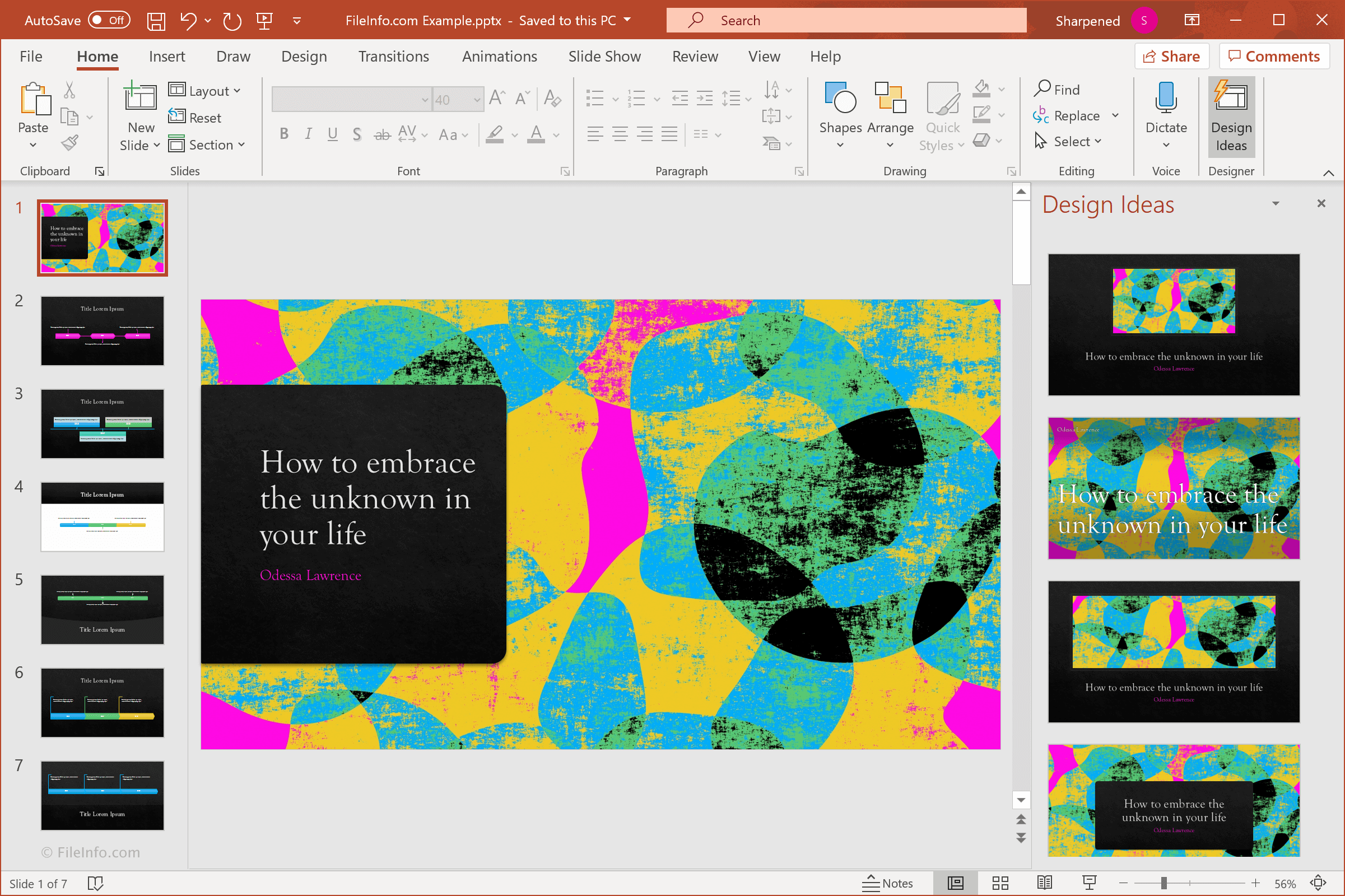
Microsoft PowerPoint is a popular program for creating presentations and slide shows. It is one of several standard applications included with Microsoft Office and is used in both business and educational environments.
PowerPoint allows you to create slides that support many different kinds of content, including text, images, drawings, as well as rich content such as audio and video. Individual objects within a slide can be displayed all at once or as a series of events. For example, you can choose to display one bullet point at a time instead of listing all the points at once. Several effects can be applied to objects within a slide, such as fading in an image or scrolling text across the screen. Transitions can also be added between slides.
PowerPoint provides several master templates that can be used as slideshow themes, and also allows you to create your own templates for custom-designed presentations. In addition to templates included within PowerPoint, there are thousands of templates in the online repository that can be used for creating presentations. PowerPoint templates are organized by keywords and categories, which helps you find the right design for your audience. Categories include Business, Calendars, Charts and Diagrams, Education, and others. Newer versions of PowerPoint save presentations in the Office Open XML (OOXML) .PPTX format, while older versions use the proprietary .PPT format.
Microsoft PowerPoint is an industry-standard application used by business professionals, teachers, and home users. It gives you the tools to create and display business figures, lessons, photo slideshows, and more. If you use any of the Microsoft Office applications, you should try Microsoft PowerPoint for your next presentation.
Primary File Type
 .PPTXMicrosoft PowerPoint Presentation
Supported File Types
| Extension | File Type |
|---|---|
| .PPTX | Microsoft PowerPoint Presentation |
| .BMP | Bitmap Image |
| .CRTX | Office 2007 Chart Template File |
| .EFTX | Office 2007 Theme Effect File |
| .EMF | Enhanced Windows Metafile |
| .GIF | Graphical Interchange Format File |
| .JPG | JPEG Image |
| Portable Document Format File | |
| .PNG | Portable Network Graphic |
| .POT | Microsoft PowerPoint Template (Legacy) |
| .POTM | Microsoft PowerPoint Macro-Enabled Template |
| .POTX | Microsoft PowerPoint Presentation Template |
| .PPA | Microsoft PowerPoint Add-in |
| .PPAM | Microsoft PowerPoint 2007 Add-In |
| .PPS | Microsoft PowerPoint Slide Show (Legacy) |
| .PPSM | Microsoft PowerPoint Macro-Enabled Show |
| .PPSX | Microsoft PowerPoint Slide Show |
| .PPT | Microsoft PowerPoint Presentation (Legacy) |
| .PPTHTML | Microsoft PowerPoint HTML Presentation |
| .PPTM | Microsoft PowerPoint Macro-Enabled Presentation |
| .PPTMHTML | Microsoft PowerPoint MIME HTML Presentation |
| .THMX | Office 2007 Theme |
| .TIF | Tagged Image File |
| .XPS | XML Paper Specification File |
Additional Related File Types
| Extension | File Type |
|---|---|
| .AIF | Audio Interchange File Format |
| .AIFF | Audio Interchange File Format |
| .ASF | Advanced Systems Format File |
| .AU | Sun Microsystems Audio File |
| .AVI | Audio Video Interleave File |
| .AW | Answer Wizard File |
| .DICPROOF | Microsoft Dictionary Proofing File |
| .EXD | Control Information Cache File |
| .GRA | Microsoft Graph File |
| .HTM | Hypertext Markup Language File |
| .HTML | Hypertext Markup Language File |
| .JPEG | JPEG Image |
| .MHT | MHTML Web Archive |
| .MHTML | MIME HTML File |
| .MID | MIDI File |
| .MIDI | MIDI Music Data |
| .MP3 | MP3 Audio |
| .MPEG | MPEG Video |
| .MPG | MPEG Video |
| .OLB | OLE Object Library |
| .PRE | Lotus Freelance Graphics File |
| .RELS | Open Office XML Relationships File |
| .RRT | Rhapzodé Resource Template |
| .RTF | Rich Text Format File |
| .TIFF | Tagged Image File Format |
| .VML | Vector Markup Language File |
| .VSS | Visio Stencil File |
| .WAV | WAVE Audio |
| .WMA | Windows Media Audio |
| .WMF | Windows Metafile |
| .WMV | Windows Media Video |