

Adobe Dreamweaver
| Version | 2021(as of 8/18/2021) |
| Platforms | Windows, Mac |
| License | Commercial |
| Category | Internet |
Main Features
- Standards-based, visual (WYSIWYG) web development
- Perspective-based workspace environment with customizable toolbars
- Syntax highlighting, code coloring, and other advanced coding features for multiple languages
- Site management and FTP/SFTP publishing
- Live view pre-publishing perspective
- Version control system integration
- Code hinting improvements for PHP and JavaScript
- Support for EcmaScript 6 and the latest version of Chromium Embedded Framework
Software Overview
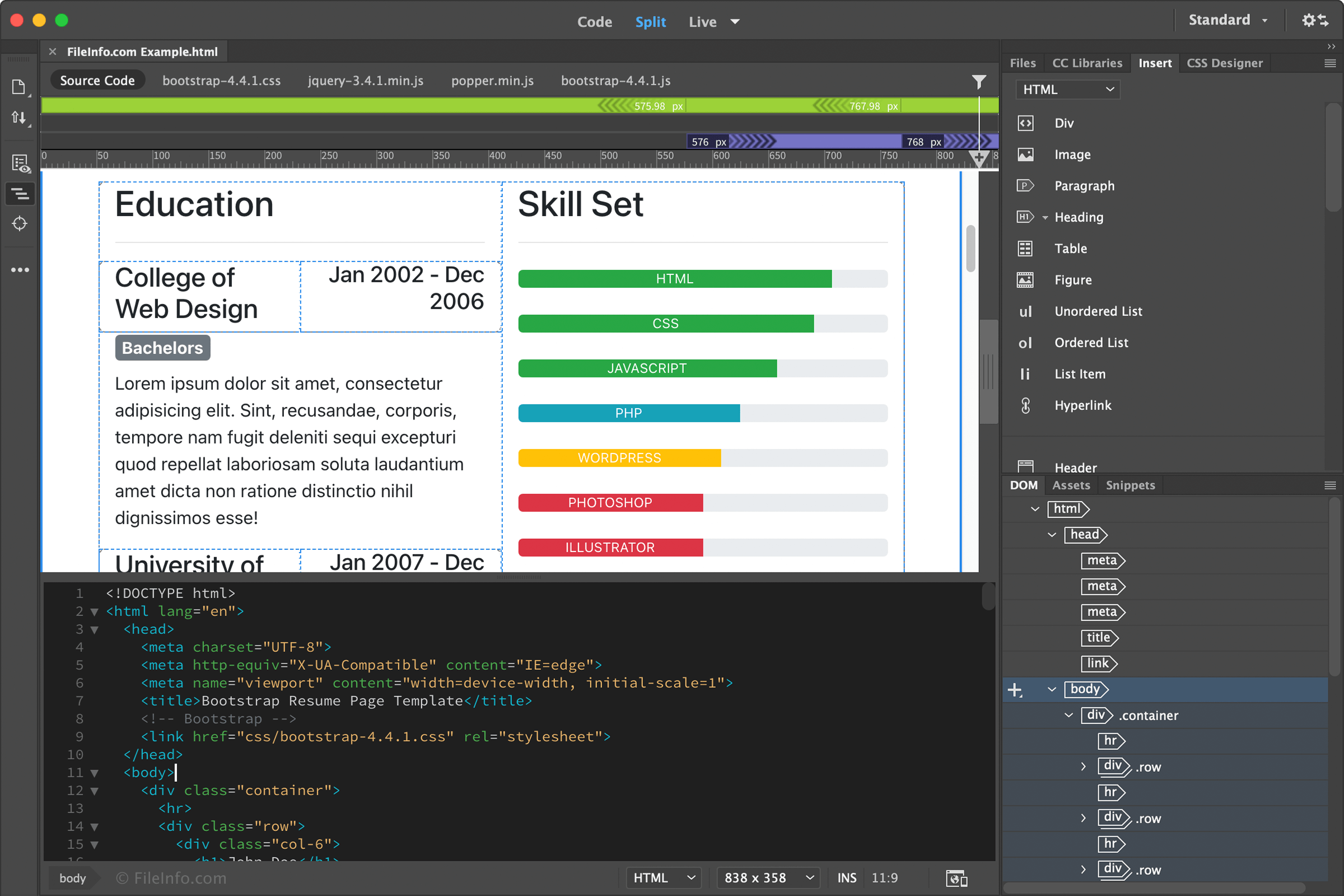
Adobe Dreamweaver is a professional web development application used for designing and maintaining websites. It provides an integrated development environment (IDE) with tools for fast and accurate coding, webpage and HTML email templates, and the ability to preview responsive sites on various screen sizes.
The Dreamweaver IDE workspace consists of a visual "WYSIWYG" editing interface that automatically generates HTML but also allows users to write HTML code manually. The application enables you to switch between editing perspectives when designing webpages, with each perspective consisting of a customized layout of toolbars, windows, and panels. While a coder’s perspective might include a text editor with syntax highlighting, a designer’s perspective may display the visual HTML editor. Some of the languages supported by Dreamweaver include .HTML, .PHP, .ASP, .XML, .CSS, and .JS (JavaScript).
Dreamweaver comes with many features that help web developers save time. The application provides customizable starter templates for building webpages, HTML emails, eCommerce pages, and more. Code generation and compliance features ensure that websites display the same across different web browsers without directly manipulating code. Syntax highlighting, code coloring, and visual hints help developers write, read, and update code faster and catch bugs before publishing the pages. Also, users can preview and edit their content in real-time in Dreamweaver before they publish, without having to view the pages in a web browser. This is especially helpful for building responsive websites for multiple browser window sizes and device screen sizes.
Summary
Adobe Dreamweaver is an impressive web development application utilized by both amateur and professional web developers. The program comes with many features that make web development more convenient and powerful. Dreamweaver is worth at least a try for web developers, especially if you are already an Adobe Creative Cloud subscriber.
Primary File Type
 .DWTDreamweaver Webpage Template
Supported File Types
| Extension | File Type |
|---|---|
| .DWT | Dreamweaver Webpage Template |
| .AS | ActionScript File |
| .ASP | Active Server Page |
| .ASPX | Active Server Page Extended Webpage |
| .ASR | ActionScript Remote Document |
| .CFC | ColdFusion Component File |
| .CFM | ColdFusion Markup File |
| .CS | C# Source Code File |
| .CSN | Adobe Code Snippet Document |
| .CSS | Cascading Style Sheet |
| .DWS | Adobe Dreamweaver Site Cache File |
| .EDM | Adobe Extension Data Markup Language File |
| .EDML | Adobe Extension Data Markup Language Document |
| .FLV | Flash Video |
| .GIF | Graphical Interchange Format File |
| .HTML | Hypertext Markup Language File |
| .INC | Include File |
| .JAVA | Java Source Code File |
| .JPG | JPEG Image |
| .JS | JavaScript File |
| .JSP | Jakarta Server Page |
| .JST | JavaServer Page Document |
| .LBI | Dreamweaver Library Item |
| .MNO | Macromedia Design Note |
| .PHP | PHP Source Code File |
| .PHP3 | PHP 3 Web Page |
| .PHP4 | PHP 4 Web Page |
| .PHP5 | PHP 5 Web Page |
| .PNG | Portable Network Graphic |
| .SSI | Adobe Dreamweaver Server Side Include File |
| .STE | Dreamweaver Site Settings File |
| .STM | SSI Web Page |
| .SWF | Shockwave Flash Movie |
| .VTM | Visual Tool Markup Language Document |
| .VTV | Adobe Dreamweaver Validator Configuration File |
| .WML | Wireless Markup Language File |
| .XHTML | Extensible Hypertext Markup Language File |
| .XML | XML File |
Additional Related File Types
| Extension | File Type |
|---|---|
| .AIF | Audio Interchange File Format |
| .AIFF | Audio Interchange File Format |
| .CONFIG | Configuration File |
| .CTP | CakePHP Template |
| .FLA | Animate Animation |
| .HTM | Hypertext Markup Language File |
| .JPEG | JPEG Image |
| .MID | MIDI File |
| .MIDI | MIDI Music Data |
| .MOV | Apple QuickTime Movie |
| .MP3 | MP3 Audio |
| Portable Document Format File | |
| .PSD | Adobe Photoshop Document |
| .QT | Apple QuickTime Movie |
| .QTM | Apple QuickTime Movie |
| .RA | RealAudio File |
| .RAM | Real Audio Metadata File |
| .RPM | RealPlayer Plugin |
| .SHTM | HTML Server Side Include File |
| .SHTML | Server Side Include HTML File |
| .SWC | Flex Components Archive |
| .SWT | Flash Generator Template |
| .VTML | Visual Tool Markup Language File |
| .WAV | WAVE Audio |
| .XHTM | Extensible Hypertext Markup Language Document |
| .XSL | XML Stylesheet |
| .XSLT | Extensible Stylesheet Language Transformations File |