

Adobe Acrobat
| Version | DC 2021(as of 1/27/2022) |
| Platforms | Windows, Mac, Linux |
| License | Commercial |
| Category | Productivity |
Main Features
- Create, edit, and publish PDFs
- Secure, encrypt, and control PDFs
- Intelligent creation of business forms
- Collaborate, track, and review PDFs in business workflows
- Fill and sign PDF forms or request signatures in a simple interface
- Bundle multimedia content in PDF files
- Compress single or multiple PDF files with one-click
- Star important files and access them from other devices
Software Overview
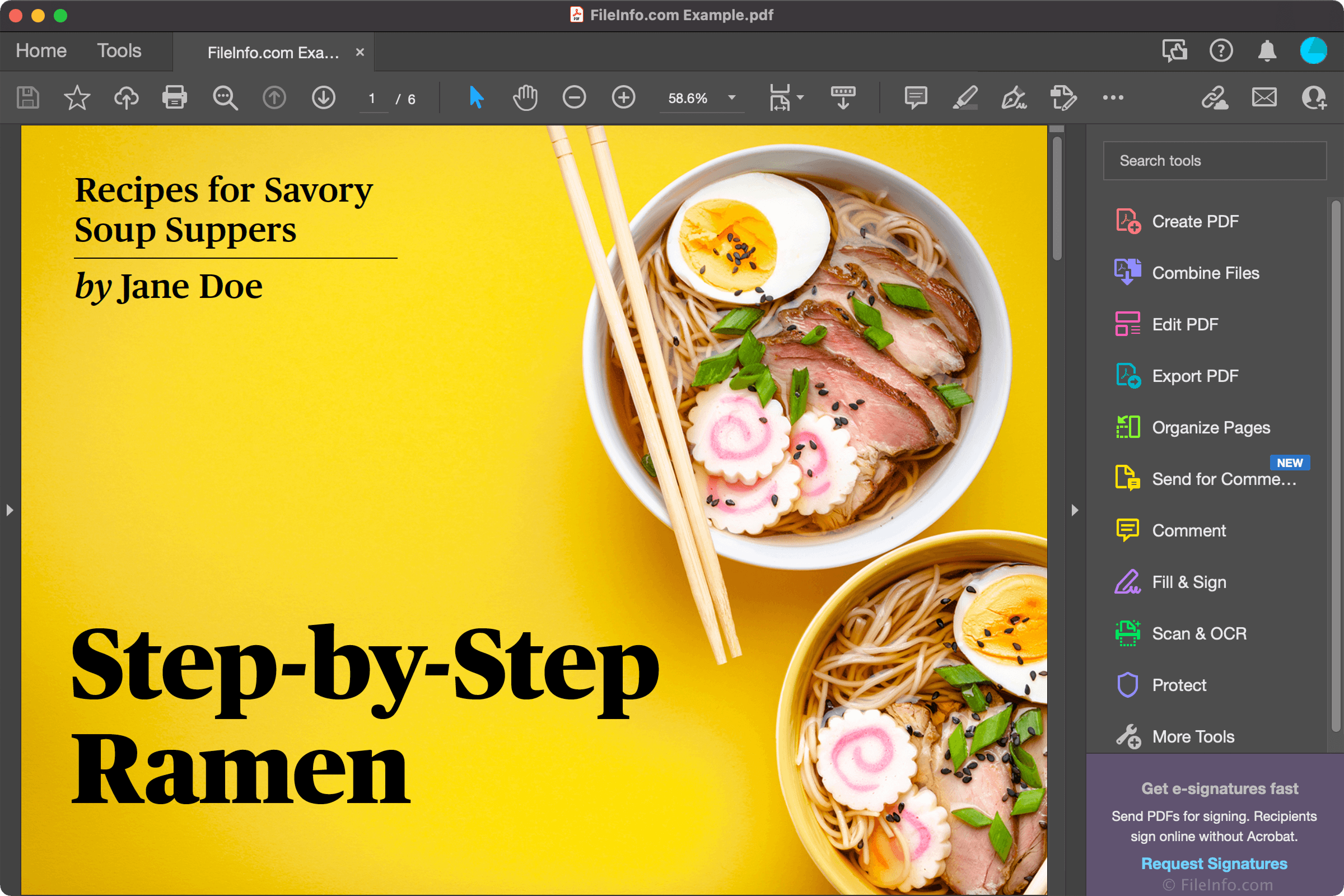
Adobe Acrobat DC is a professional PDF (Portable Document Format) management application. The software provides various tools for creating, editing, converting, sharing, reviewing, and signing .PDF files. It is the upgraded version of Adobe Acrobat Reader, and is available as a monthly subscription in the Acrobat Standard DC (available for Windows only) and Acrobat Pro DC (available for Windows and macOS) offerings.
Acrobat provides a Home screen where you can access PDF files you have opened or shared with others for viewing, reviewing, and signing purposes. The program offers many tools for working with your PDF files, whether they are legal documents, reports, essays, employment applications, brochures, posters, or business forms. You can build a document from scratch, combine multiple files into one PDF, edit a PDF, enhance scanned documents, compress single or multiple PDFs with one click, and more. You can also convert PDFs to various formats, including Microsoft Office (.DOCX, .DOC, .XLSX, .XLS, .PPTX, and .PPT), .JPEG, .TIFF, .PNG, and .RTF.
Adobe's OCR technology enables accurate scanning, indexing, and searching of paper documents. When scanning documents and forms, Acrobat appropriately detects text, font, colors, and images. The application can create PDF Portfolios containing multiple documents, 2D and 3D images, videos, and maps. Also, you can compose PDF forms with editable fields users can fill out and save with Acrobat or Acrobat Reader.
Acrobat allows you to encrypt, password-protect, and digitally sign a document to protect its contents and verify its author. In addition, you can review document modifications with revision control, a feature that displays colored highlights for items a user has inserted, replaced, deleted, or moved within the document.
Summary
Adobe Acrobat is the best application for professionals working with PDFs across all industries. If you use it at home, you may also find Acrobat valuable for scanning documents and saving files in a standard format you can share with friends and family. Adobe Acrobat DC will prove an essential tool no matter where you use it.
Primary File Type
 .PDFPortable Document Format File
Supported File Types
| Extension | File Type |
|---|---|
| Portable Document Format File | |
| .3G2 | 3GPP2 Multimedia File |
| .3GP | 3GPP Multimedia File |
| .ACRODATA | Acrobat Data File |
| .APF | Adobe Profile File |
| .BMP | Bitmap Image |
| .DST | AutoCAD Sheet Set |
| .DWT | AutoCAD Drawing Template |
| .EMF | Enhanced Windows Metafile |
| .EPS | Encapsulated PostScript File |
| .F4V | Flash MP4 Video File |
| .FLV | Flash Video |
| .GIF | Graphical Interchange Format File |
| .HTML | Hypertext Markup Language File |
| .JDF | Adobe Acrobat Job Definition File |
| .JOBOPTIONS | Adobe Joboptions File |
| .JP2 | JPEG 2000 Core Image |
| .JPG | JPEG Image |
| .JPX | JPEG 2000 Image File |
| .M4V | iTunes Video File |
| .MARS | Adobe MARS File |
| .MJD | Adobe Acrobat MIME Encoded Job Definition File |
| .MOV | Apple QuickTime Movie |
| .MP3 | MP3 Audio |
| .MP4 | MPEG-4 Video |
| .PCX | Paintbrush Bitmap Image File |
| .PDX | Adobe Acrobat Index File |
| .PNG | Portable Network Graphic |
| .PRN | Print to File |
| .PS | PostScript File |
| .RLE | Run Length Encoded Bitmap |
| .SEQU | Adobe Acrobat Sequence File |
| .SWF | Shockwave Flash Movie |
| .TIF | Tagged Image File |
| .TXT | Plain Text File |
| .U3D | Universal 3D File |
| .WWF | World Wide Fund Non-Printable Document |
| .XDP | XML Data Package |
| .XFDF | Adobe Acrobat XFDF File |
| .XPS | XML Paper Specification File |
Additional Related File Types
| Extension | File Type |
|---|---|
| .ACROBATSECURITYSETTINGS | Adobe Acrobat Security Settings File |
| .ACROPLUGIN | Adobe Acrobat Plug-in |
| .AI | Adobe Illustrator Artwork |
| .AIF | Audio Interchange File Format |
| .AIFF | Audio Interchange File Format |
| .API | Acrobat Plug-in |
| .ASF | Advanced Systems Format File |
| .AST | Adobe Color Separations Table |
| .AVI | Audio Video Interleave File |
| .CER | Internet Security Certificate |
| .CHS | Adobe ActiveX Resource File |
| .CLX | Standard Dictionary File |
| .DOC | Microsoft Word Document (Legacy) |
| .DOCX | Microsoft Word Document |
| .ENV | Adobe Dictionary Data File |
| .EPSF | Encapsulated PostScript Format File |
| .FCDT | FormsCentral Design Template |
| .FDF | Acrobat Forms Data Format |
| .HTM | Hypertext Markup Language File |
| .J2K | JPEG 2000 Image |
| .JPEG | JPEG Image |
| .JPF | JPEG 2000 Image |
| .LEX | Adobe Linguistic Library Data File |
| .LNG | Acrobat Language Plugin |
| .M4A | MPEG-4 Audio |
| .MPA | MPEG-2 Audio File |
| .MPEG | MPEG Video |
| .MPG | MPEG Video |
| .P12 | Personal Information Exchange File |
| .P7C | PKCS #7 Certificate File |
| .PDP | Adobe Portable Document Format File |
| .PFX | PKCS #12 Certificate File |
| .PSID | PostScript Image Data File |
| .RAM | Real Audio Metadata File |
| .RTF | Rich Text Format File |
| .SHTML | Server Side Include HTML File |
| .TIFF | Tagged Image File Format |
| .WAV | WAVE Audio |
| .WMA | Windows Media Audio |
| .WMV | Windows Media Video |
| .XFD | FormFlow 99 Form Data File |
| .XML | XML File |