

Microsoft Word
| Version | 365(as of 2/12/2021) |
| Platforms | Windows, Mac |
| License | Commercial |
| Category | Productivity |
Main Features
- Support for DOCX and DOC formats, and various other document types
- Customized application workspace toolbar layouts
- Document templating and custom page formatting
- Real-time co-authoring in Word
- Integrated graphics drawing and image manipulation
- Mail merge document generation and database integration
- Advanced macro scripting support
Software Overview
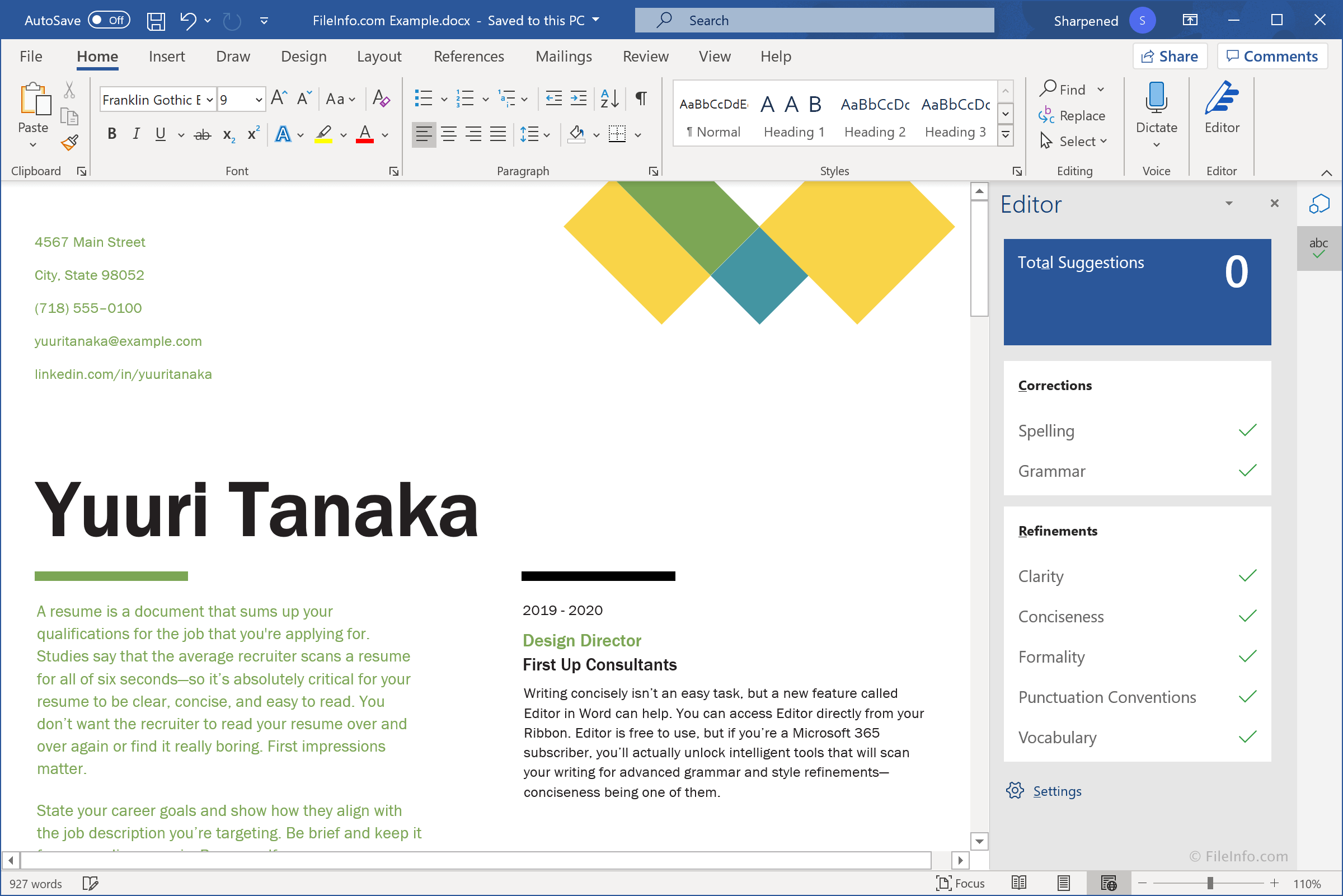
Microsoft Word is an industry-standard word processing program included in the Microsoft Office suite along with Excel and PowerPoint. It is used for authoring documents for personal and business use, such as letters, resumes, invitations, brochures, newsletters, and posters.
Word includes basic page and text formatting capabilities and offers several advanced features, such as mail merge, change tracking, document merging, and macro scripting. The word processor saves documents in the Office Open XML .DOCX format, by default. The program may also save documents in the proprietary .DOC format, which was commonly used by earlier versions of Word. The application also provides support for embedded online pictures and videos, enabling rich content within documents.
The Word user interface streamlines the process of creating new documents from document templates. The word processor includes thousands of downloadable online document templates, which serve as a starting point for creating new documents. Templates are available for several types of documents, including business forms, labels, envelopes, menus, newsletters, planners, and home and educational documents. Custom templates (which are saved .DOT and .DOTX files) can also be created for company letterheads and other types of documents that require a consistent look and feel.
Once you select a template (or blank document), you have a myriad of ribbon-style toolbars and other options available for authoring and styling documents. Word provides collaborative editing and review tools for teams. Collaborators can edit the same document in real-time or add comments. The word processor also keeps a history of changes, which is useful when multiple users are working on a single document. Also, the commenting and reply system allows teams to have short discussions of document content.
If you have ever created a document in school or at work, you most likely have used Microsoft Word. It is an industry-standard word processor for creating book reports, academic publications, business documents, recipes, and more. Its support of popular formats and wide usage make Microsoft Word the best choice for all of your word processing needs.
Primary File Type
 .DOCXMicrosoft Word Document
Supported File Types
| Extension | File Type |
|---|---|
| .DOCX | Microsoft Word Document |
| .BMP | Bitmap Image |
| .CRTX | Office 2007 Chart Template File |
| .DOC | Microsoft Word Document (Legacy) |
| .DOCHTML | Microsoft Word HTML Document |
| .DOCM | Microsoft Word Macro-enabled Document |
| .DOCMHTML | Microsoft Word MIME HTML Document |
| .DOCX | Microsoft Word Document |
| .DOT | Microsoft Word Document Template (Legacy) |
| .DOTHTML | Microsoft Word HTML Document Template |
| .DOTM | Microsoft Word Macro-Enabled Document Template |
| .DOTX | Microsoft Word Template |
| .EFTX | Office 2007 Theme Effect File |
| .EMF | Enhanced Windows Metafile |
| .GIF | Graphical Interchange Format File |
| .JPG | JPEG Image |
| .ODT | OpenDocument Text Document |
| Portable Document Format File | |
| .PICT | Picture File |
| .PNG | Portable Network Graphic |
| .PSW | Pocket Word Document |
| .PWI | Pocket Word Document |
| .RTF | Rich Text Format File |
| .TXT | Plain Text File |
| .WBK | Microsoft Word Document Backup File |
| .WIZ | Microsoft Wizard File |
| .WLL | Microsoft Word Add-in File |
Additional Related File Types
| Extension | File Type |
|---|---|
| .ASD | Microsoft Word AutoSave File |
| .AW | Answer Wizard File |
| .BPS | Works Document Backup |
| .CDR | CorelDRAW File |
| .CGM | Computer Graphics Metafile |
| .CSV | Comma-Separated Values File |
| .DDF | Diamond Directive File |
| .DIB | Device-Independent Bitmap Image |
| .DIC | Dictionary File |
| .DICPROOF | Microsoft Dictionary Proofing File |
| .DXF | Drawing Exchange Format File |
| .EXD | Control Information Cache File |
| .FPX | FlashPix Bitmap Image File |
| .GLY | Microsoft Word Glossary File |
| .GRA | Microsoft Graph File |
| .HTM | Hypertext Markup Language File |
| .HTML | Hypertext Markup Language File |
| .HTX | HTML Extension File |
| .INI | Windows Initialization File |
| .ISS | Inno Setup Script |
| .JPEG | JPEG Image |
| .ME | Readme Text File |
| .MHT | MHTML Web Archive |
| .MHTML | MIME HTML File |
| .OLB | OLE Object Library |
| .OLK | Outlook Address Book File |
| .OTM | Outlook Macro File |
| .OUT | Output File |
| .PAB | Personal Address Book |
| .PCD | Kodak Photo CD Image |
| .PCT | Picture File |
| .PCX | Paintbrush Bitmap Image File |
| .PWD | Solid Edge Weldment Document |
| .PWT | Pocket Word Template |
| .RELS | Open Office XML Relationships File |
| .RLE | Run Length Encoded Bitmap |
| .SAM | Ami Pro Document |
| .SBV | YouTube Captions File |
| .SHS | Microsoft Scrap File |
| .THMX | Office 2007 Theme |
| .TIF | Tagged Image File |
| .TIFF | Tagged Image File Format |
| .TMP | Temporary File |
| .VML | Vector Markup Language File |
| .VSS | Visio Stencil File |
| .WMF | Windows Metafile |
| .WPC | WordPad Converter File |
| .WPD | WordPerfect Document |
| .WPF | WordPerfect Form |
| .WPT | Works Template |
| .WRI | Microsoft Write Document |
| .XPS | XML Paper Specification File |